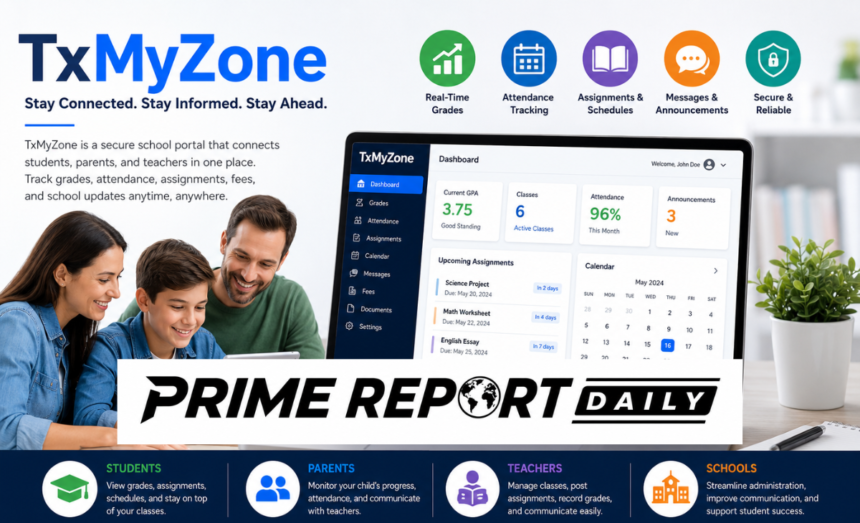
Managing school information has become much easier with digital education platforms, and TxMyZone is one of the solutions designed to keep students, parents, teachers, and school administrators connected. Instead of relying on paper reports, phone calls, or scattered emails, the platform brings important academic information into one secure online portal.
Whether you’re a student checking assignment deadlines, a parent monitoring your child’s progress, or a teacher managing classroom activities, TxMyZone offers a convenient way to stay informed throughout the school year.
In this guide, you’ll learn what TxMyZone is, how it works, its key features, benefits for different users, and practical tips for getting the most from the platform.
What Is TxMyZone?
TxMyZone is a web-based school management portal that allows educational institutions to organize academic records, communication, attendance, grading, schedules, and other essential information in one centralized system.
The platform is designed to improve communication between schools and families while making everyday administrative tasks faster and more efficient.
Instead of contacting the school office for every update, authorized users can simply log in to their accounts and access the information they need anytime.
Quick Answer
TxMyZone is a secure online education portal that helps schools manage student information while giving students, parents, and teachers instant access to grades, attendance, assignments, announcements, and school-related communication.
Why Schools Use TxMyZone
Modern schools handle thousands of pieces of information every day. Managing attendance records, report cards, fee payments, schedules, and parent communication manually can be time-consuming.
TxMyZone simplifies these tasks by providing a centralized digital platform where authorized users can securely access real-time information from any internet-connected device.
Many schools adopt platforms like TxMyZone because they help reduce paperwork, improve communication, and create a more transparent learning environment.
How TxMyZone Works
Behind its simple interface, TxMyZone connects multiple school management systems into one secure platform. Every authorized user receives a personalized dashboard based on their role within the school.
For example:
- Students can access assignments and grades.
- Parents can monitor attendance and academic progress.
- Teachers can manage classrooms and update student records.
- School administrators can oversee reports and school operations.
Whenever new information is entered into the system, it becomes available almost immediately to users with the appropriate permissions.
This real-time synchronization helps everyone stay informed without unnecessary delays.
Centralized Dashboard
The dashboard acts as the main control center.
Instead of opening several different applications, users can access everything from one place, including:
- Academic records
- Attendance history
- Assignment schedules
- School announcements
- Fee information
- Teacher communication
- Calendar events
This organized layout makes navigation simple, even for users with limited technical experience.
Secure Data Synchronization
One of TxMyZone’s biggest strengths is its ability to keep information synchronized.
For example:
- A teacher uploads quiz grades.
- Students immediately see updated scores.
- Parents receive notifications about new grades.
- School records update automatically.
This process eliminates duplicate work while ensuring everyone views the same information.
Personalized User Access
Every account displays different information depending on the user’s role.
Student Dashboard
Students can view:
- Current grades
- Homework assignments
- Upcoming exams
- Attendance records
- Class schedules
- Teacher feedback
This helps students become more responsible for their academic progress.
Parent Dashboard
Parents can access:
- Child’s attendance
- Academic performance
- School announcements
- Teacher messages
- Upcoming events
- Fee information
Having this information available at any time allows parents to support their children’s education more effectively.
Teacher Dashboard
Teachers receive tools for:
- Recording attendance
- Managing assignments
- Uploading grades
- Sending announcements
- Tracking student progress
- Communicating with parents
These features reduce administrative work and allow teachers to spend more time focusing on instruction.
Key Features of TxMyZone
The popularity of TxMyZone comes from its practical features that simplify everyday school management.
Here are some of the platform’s most useful capabilities.
Real-Time Grade Updates
Instead of waiting for report cards, students and parents can view grades shortly after teachers publish them.
This immediate access allows students to:
- Identify weak subjects early
- Improve study habits
- Prepare for upcoming assessments
- Seek extra help before final exams
Parents also gain a clearer understanding of their child’s academic progress throughout the semester.
Attendance Monitoring
Attendance plays an important role in student success.
TxMyZone allows users to review attendance records without contacting the school office.
Parents can quickly check:
- Present days
- Absences
- Late arrivals
- Attendance history
Teachers and administrators also benefit from automated attendance tracking, reducing manual paperwork.
Assignment and Homework Tracking
Keeping track of homework becomes much easier with the integrated assignment management system.
Students can view:
- Assignment titles
- Submission deadlines
- Project instructions
- Teacher comments
- Completion status
Instead of searching through notebooks or emails, everything remains organized within one portal.
School Calendar Integration
The built-in calendar helps everyone stay informed about important dates.
It typically includes:
- Examination schedules
- School holidays
- Parent-teacher meetings
- Assignment deadlines
- Sports events
- School activities
Students can better plan their study routines while parents can coordinate family schedules accordingly.
Secure Messaging System
Communication is one of the biggest advantages of using TxMyZone.
Rather than depending on scattered emails or paper notices, the platform provides an internal messaging system where users can communicate safely.
Teachers can:
- Send class announcements
- Answer parent questions
- Share assignment updates
- Notify students about schedule changes
Parents receive messages in one organized location, making communication faster and more reliable.
Mobile-Friendly Access
Today’s families rely heavily on smartphones.
TxMyZone is designed to work across multiple devices, allowing users to access information from:
- Desktop computers
- Laptops
- Tablets
- Smartphones
The responsive interface adjusts automatically to different screen sizes, making it convenient whether users are at home, work, or traveling.
Notification Alerts
Missing important school updates can create unnecessary stress.
TxMyZone helps prevent this by sending notifications for events such as:
- Newly posted grades
- Assignment deadlines
- Teacher announcements
- Attendance updates
- School events
- Emergency notices
Users can customize notification preferences based on their needs.
Secure Account Protection
Educational records contain sensitive personal information.
To help protect user privacy, TxMyZone typically includes security features such as:
- Encrypted connections
- Password protection
- Role-based permissions
- Secure login sessions
- Account verification
These measures help ensure that confidential student information remains accessible only to authorized individuals.
Benefits of TxMyZone for Students
Students are among the biggest beneficiaries of digital learning portals.
By providing instant access to academic information, TxMyZone encourages better organization, accountability, and time management.
Stay Updated on Academic Progress
Rather than waiting weeks for report cards, students can monitor their academic performance throughout the school year.
This helps them:
- Recognize strengths
- Identify areas needing improvement
- Prepare for upcoming assessments
- Set realistic academic goals
Regular access to progress reports encourages continuous improvement instead of last-minute exam preparation.
Better Assignment Management
One common challenge students face is forgetting homework or project deadlines.
With TxMyZone, assignments remain organized in one place.
Students can quickly review:
- Due dates
- Instructions
- Submission status
- Teacher feedback
This reduces missed deadlines and supports better study habits.
Easier Access to Learning Resources
Teachers often upload educational materials directly through the portal.
Depending on how a school uses the platform, students may access:
- Study guides
- Classroom notes
- Assignment instructions
- Learning materials
- Important documents
Having these resources available online allows students to review lessons whenever needed.
Improved Communication with Teachers
Students can stay informed through announcements and classroom updates without relying solely on verbal reminders.
When expectations are communicated clearly, students are less likely to miss important deadlines or classroom changes.
Benefits of TxMyZone for Parents
Parents play a vital role in a child’s education, and staying informed can make a significant difference in academic success. TxMyZone gives parents direct access to important school information, allowing them to support their children without waiting for report cards or scheduled meetings.
With everything available in one secure portal, parents can quickly check grades, attendance, assignments, and school announcements whenever it’s convenient.
Monitor Academic Performance Anytime
Instead of wondering how their child is performing, parents can log in and review academic progress throughout the school year.
They can easily view:
- Current grades
- Test scores
- Assignment completion
- Teacher feedback
- Overall academic progress
Having this information readily available allows parents to recognize achievements early and provide support whenever challenges arise.
Keep Track of Attendance
Regular attendance is closely linked to student success.
TxMyZone allows parents to monitor attendance records in real time, making it easier to identify patterns such as frequent absences or late arrivals.
This feature helps families address attendance issues before they begin affecting academic performance.
Stay Connected with Teachers
Strong communication between parents and teachers creates a better learning environment.
The built-in messaging system allows parents to:
- Ask questions about assignments
- Discuss student progress
- Receive classroom updates
- Clarify school policies
- Stay informed about upcoming events
Instead of relying on handwritten notes or missed phone calls, conversations remain organized within the portal.
Help Children Stay Organized
Parents can view the same academic calendar and assignment schedule their children see.
This makes it easier to:
- Plan homework time
- Prepare for exams
- Organize extracurricular activities
- Balance family schedules
Working together helps students develop responsibility and better time-management skills.
Benefits of TxMyZone for Teachers and School Staff
Teachers spend a considerable amount of time managing administrative work in addition to teaching. TxMyZone helps simplify many daily tasks through digital automation.
With fewer manual processes, educators can dedicate more time to classroom instruction and student development.
Simplified Grade Management
Instead of calculating grades manually, teachers can enter scores directly into the system.
The platform automatically organizes:
- Quiz grades
- Homework scores
- Project results
- Final averages
- Progress reports
This reduces calculation errors while saving valuable time.
Faster Attendance Recording
Recording attendance digitally is much faster than using paper registers.
Teachers can:
- Mark attendance
- Record late arrivals
- Track absences
- Generate attendance reports
The information immediately becomes available to authorized parents and administrators.
Better Classroom Communication
Teachers often need to send announcements to an entire class or individual families.
TxMyZone makes this simple by allowing teachers to share:
- Homework reminders
- Exam schedules
- Classroom announcements
- Event information
- Important updates
Keeping communication inside one platform helps prevent missed messages.
Assignment Distribution
Teachers can upload assignments directly through the portal.
Students receive clear instructions, while teachers can monitor submission status and maintain organized classroom records.
This reduces paperwork and makes assignment management more efficient.
Reporting and Administrative Tools
School administrators and teachers often need detailed reports for planning and decision-making.
TxMyZone can help generate reports related to:
- Student performance
- Attendance statistics
- Grade distribution
- Classroom activity
- Academic trends
These insights help schools identify areas where additional support may be needed.
TxMyZone vs Other School Management Platforms
Many educational platforms provide digital learning tools, but each serves a different purpose. Understanding these differences helps schools and families choose the right solution for their needs.
| Feature | TxMyZone | Google Classroom | Traditional Parent Portals |
| Student Grades | ✔ | Limited | ✔ |
| Attendance Tracking | ✔ | ✖ | Limited |
| Parent Communication | ✔ | Limited | ✔ |
| Assignment Management | ✔ | ✔ | Limited |
| School Announcements | ✔ | Limited | Limited |
| Fee Information | ✔ (where supported) | ✖ | Sometimes |
| Mobile Access | ✔ | ✔ | Depends on the school |
TxMyZone vs Google Classroom
Google Classroom focuses primarily on digital learning and assignment management.
Students use it to:
- Submit homework
- Access classroom materials
- Participate in online learning
- Collaborate with teachers
TxMyZone, however, provides a broader school management experience by including attendance records, grades, communication, schedules, and administrative information.
Many schools successfully use both platforms together.
TxMyZone vs Blackboard and Canvas
Blackboard and Canvas are comprehensive learning management systems commonly used by colleges and universities.
They include advanced tools for:
- Online courses
- Digital assessments
- Course content
- Virtual discussions
TxMyZone focuses more on K–12 school administration and family communication, making it easier for parents, students, and teachers to stay connected.
TxMyZone vs Traditional School Portals
Older school portals often provide limited functionality and outdated interfaces.
TxMyZone offers a more modern experience by combining multiple services into one dashboard, reducing the need to switch between different systems.
How to Get Started with TxMyZone
Getting started is usually straightforward once your school provides access credentials.
Although individual schools may have slightly different procedures, the general process remains similar.
Find Your School’s Login Portal
Most schools include the TxMyZone login link on their official website.
Look for sections such as:
- Parent Portal
- Student Portal
- Family Resources
- School Services
If you cannot locate the login page, contact your school’s administrative office.
Create Your Account
New users typically receive registration instructions from their school.
During registration, you may need:
- Student ID
- Registration code
- Parent access code
- School-issued email
- Date of birth verification
Follow each step carefully to activate your account successfully.
Verify Your Information
After registration, review your personal details.
Confirm that your:
- Email address
- Phone number
- Emergency contacts
- Notification preferences
are accurate so you receive important updates without interruption.
Explore Your Dashboard
After logging in for the first time, spend a few minutes becoming familiar with the dashboard.
Useful sections usually include:
- Grades
- Attendance
- Calendar
- Messages
- Assignments
- Notifications
- School announcements
Understanding where everything is located makes daily use much easier.
How to Use TxMyZone Every Day
Checking the portal regularly helps students and parents stay informed throughout the school year.
Even spending a few minutes each day can prevent missed deadlines and communication gaps.
Review Grades Frequently
Checking grades regularly allows students to monitor academic performance before report cards are issued.
If scores begin to decline, students can seek help sooner rather than waiting until the end of the term.
Check Upcoming Assignments
The assignment section helps students stay organized by displaying:
- Homework
- Projects
- Quizzes
- Exam dates
- Submission deadlines
Reviewing this information each morning helps students plan their workload effectively.
Read School Announcements
Schools often post important updates regarding:
- Schedule changes
- Weather closures
- Parent meetings
- School events
- Academic deadlines
Reading announcements regularly ensures families stay informed.
Respond to Teacher Messages
If teachers send questions or important reminders, timely responses help keep communication clear and productive.
Parents should also encourage students to read messages from teachers regularly.
Customize Notification Settings
Users can usually choose how they receive alerts.
Common notification options include:
- Email notifications
- Mobile alerts
- Push notifications
- SMS messages (where available)
Selecting preferred notification methods helps avoid missing important school updates.
Keep Your Profile Updated
Whenever your contact information changes, update your profile immediately.
Accurate information ensures the school can contact you during emergencies or important academic situations.
TxMyZone Security, Privacy, and Data Protection
Because TxMyZone stores sensitive student and school information, security is one of the platform’s most important priorities. Schools need a reliable system that protects academic records while allowing authorized users to access information quickly and safely.
The platform uses multiple security measures to reduce the risk of unauthorized access and keep personal information confidential.
Secure Login System
Users must sign in with their assigned credentials before accessing the portal.
Depending on how a school configures the system, login security may include:
- Strong password requirements
- Secure HTTPS encryption
- Automatic session timeouts
- Account verification
- Multi-factor authentication (where available)
These safeguards help protect accounts from unauthorized access.
Role-Based Permissions
Not everyone should have access to the same information.
TxMyZone uses role-based permissions so users only see data relevant to their responsibilities.
For example:
- Students can view only their own academic records.
- Parents can access information related to their enrolled children.
- Teachers can manage students assigned to their classes.
- Administrators receive broader access to school management tools.
This approach improves both privacy and data security.
Data Encryption
Information exchanged between users and the platform is typically protected through encrypted connections.
Encryption helps prevent unauthorized parties from reading sensitive data while it travels across the internet.
This is especially important when accessing the portal from public or shared networks.
Tips for Keeping Your Account Safe
Users also play an important role in protecting their accounts.
Follow these best practices:
- Create a strong, unique password.
- Never share your login credentials.
- Log out after using public computers.
- Keep your browser updated.
- Avoid clicking suspicious emails requesting login details.
- Change your password immediately if you suspect unauthorized access.
Simple security habits can significantly reduce the risk of account compromise.
Common TxMyZone Problems and How to Fix Them
Like any online platform, users may occasionally experience technical issues. Fortunately, most problems can be resolved with a few simple troubleshooting steps.
Unable to Log In
If you cannot access your account:
- Double-check your username and password.
- Ensure Caps Lock is turned off.
- Clear your browser’s cache and cookies.
- Try a different browser.
- Reset your password using the “Forgot Password” option.
- Contact your school’s IT department if the issue continues.
Most login problems are caused by incorrect credentials or expired passwords.
Missing Grades
Sometimes grades do not appear immediately after an assignment is completed.
Possible reasons include:
- The teacher has not published the grades yet.
- Assignments are still being reviewed.
- The grading period has not closed.
- Temporary system synchronization delays.
If grades remain unavailable for several days, politely contact your teacher through the messaging feature.
Attendance Information Is Incorrect
If attendance records appear inaccurate:
- Confirm the class date.
- Wait for teachers to complete attendance updates.
- Contact the school office if the issue continues.
Schools can usually correct attendance records quickly after verification.
Notifications Are Not Working
If you are not receiving alerts:
- Check your notification settings.
- Verify your email address.
- Ensure your phone allows app notifications.
- Disable battery-saving settings that may block alerts.
- Check your spam or junk email folder.
Updating notification preferences often resolves the issue.
Website Loading Slowly
Slow loading may result from:
- Poor internet connection
- Browser cache issues
- Temporary server maintenance
- Outdated browser versions
Refreshing the page or switching to another network often improves performance.
Advanced Tips for Getting the Most from TxMyZone
Once you’re familiar with the basics, several strategies can help you use the platform more efficiently.
Check the Dashboard Daily
Spending just five minutes each day reviewing your dashboard can help you stay ahead of assignments, announcements, and upcoming exams.
Regular use reduces the chance of missing important deadlines.
Enable Instant Notifications
Push notifications provide immediate updates whenever:
- Grades are posted
- Assignments are added
- Attendance changes
- Teachers send messages
- School announcements are published
Real-time alerts help families stay informed without constantly logging in.
Use the Calendar for Long-Term Planning
Instead of focusing only on today’s homework, review the monthly calendar.
Planning ahead helps students prepare for:
- Midterm exams
- Final examinations
- School projects
- Holiday schedules
- Parent-teacher conferences
- Extracurricular activities
Long-term planning reduces stress during busy academic periods.
Organize Assignments by Priority
Not every assignment carries the same importance.
Students should prioritize work based on:
- Submission deadlines
- Grade percentage
- Difficulty level
- Required preparation time
A structured approach improves productivity throughout the semester.
Review Progress Reports Regularly
Don’t wait until report cards arrive.
Weekly progress reviews allow students and parents to identify academic challenges early and take action before grades decline significantly.
Best Practices for Students, Parents, and Teachers
Everyone benefits when the platform is used consistently.
AFor Students
- Log in several times each week.
- Complete assignments before deadlines.
- Read teacher announcements carefully.
- Monitor grades after assessments.
- Ask questions when clarification is needed.
For Parents
- Review attendance regularly.
- Discuss academic progress with your child.
- Enable important notifications.
- Stay engaged with teacher communication.
- Encourage consistent study habits.
For Teachers
- Update grades promptly.
- Post announcements regularly.
- Keep assignment instructions clear.
- Respond to parent messages professionally.
- Use reporting tools to monitor student progress.
Final Verdict
TxMyZone provides a practical solution for modern school communication and academic management. By bringing grades, attendance, assignments, calendars, and messaging into one secure platform, it helps students, parents, teachers, and administrators stay connected throughout the academic year.
For students, the portal encourages better organization and greater responsibility. Parents gain real-time visibility into their child’s education, while teachers benefit from streamlined classroom management and reduced administrative workload.
Although features may vary between school districts, the platform’s primary goal remains the same: making school information easier to access, manage, and share securely.
When used consistently, TxMyZone can improve communication, support student success, and create a more transparent educational experience for everyone involved.
FAQ’s
Is TxMyZone free for students and parents?
In most schools, students and parents can use TxMyZone at no additional cost. Access is generally provided by the educational institution as part of its student management system.
Can I use TxMyZone on my smartphone?
Yes. TxMyZone is designed to work on smartphones, tablets, laptops, and desktop computers. Some schools may also provide a dedicated mobile application or a mobile-friendly web portal.
How often is information updated?
Updates usually appear after teachers or school staff enter new information into the system. The timing may vary depending on each school’s internal processes.
What should I do if I forget my password?
Use the Forgot Password option available on the login page. If you’re unable to reset your password, contact your school’s administration or technical support team for assistance.
Can multiple parents access the same student’s information?
Many schools allow multiple authorized guardians to have separate login credentials for the same student. Availability depends on the school’s account management policies.
Is my personal information secure?
TxMyZone uses secure login procedures, encrypted connections, and permission-based access to help protect student and family information. Users should also follow good password security practices to keep their accounts safe.
Can teachers communicate directly with parents through TxMyZone?
Yes. Many schools use the platform’s messaging features to share announcements, discuss student progress, answer questions, and provide important classroom updates.
Does TxMyZone replace parent-teacher meetings?
No. While the platform improves everyday communication, parent-teacher conferences remain valuable for discussing a student’s overall academic development and future goals.
Conclusion
As schools continue adopting digital technology, platforms like TxMyZone play an increasingly important role in improving communication and simplifying academic management. From monitoring grades and attendance to organizing assignments and receiving school announcements, the portal provides a centralized solution that benefits the entire school community.
Whether you are a student striving for better academic performance, a parent wanting to stay involved, or a teacher managing multiple classes, TxMyZone offers practical tools that make daily school life more organized and efficient.